
Staff training · 3 minutes
Your panic fob: how to raise a lockdown, and what to do next
Please go through this before your first day. It shows how your panic fob raises a lockdown, what happens next, and what to do when the lockdown sounds.
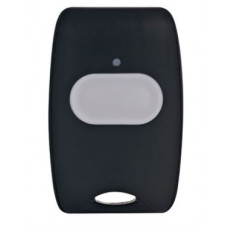
1. Press and hold for 3 seconds to raise a lockdown
Wear your panic fob on your lanyard at all times. If there's a threat to the site, such as an intruder or a dangerous incident nearby, press and hold the button for 3 seconds. That's all you need to do. Because the button has to be held down, a knock or a brief press won't set it off, which reduces or eliminates the chance of an accidental alert.
Watch: press and hold
What happens when you press your panic fob
Raised an alert by mistake? The 3-second hold makes this very unlikely, but don't worry. The Alarm Receiving Centre always checks with your school before any police call is made. Tell the office straight away so they can confirm it was accidental.
2. When the lockdown sounds
- 1
Get everyone insidethe nearest safe room. Don't go back for belongings.
- 2
Lock or block the doorClose blinds, turn off lights and screens.
- 3
Keep everyone quietlow down and away from doors and windows.
- 4
Phones on silentWatch the EdAlert app and follow your school's lockdown plan.
- 5
Stay put until the all-clearIt's only ever given in person by an authorised member of staff, never by a siren or a message.
Fire alarm? Evacuate as normal.
Lockdown tone? Stay in.
Before your first day, check you know:
- I know where my panic fob is, and that pressing and holding it for 3 seconds raises a full lockdown
- I know a 3-second hold stops accidental alerts, and any alert raised by mistake is checked by the Alarm Receiving Centre before any police call
- I know the lockdown tone means stay in, and the fire alarm means evacuate
- I know the all-clear is only ever given in person
Not sure about anything? Ask your line manager or designated safeguarding lead, and follow your school's own lockdown plan.